
Instead of asking Codex to review its own changes after every edit, use a code linter for Codex to check those changes against plain-English project rules. This 2026 guide shows how to set up Perch, verify a rule with a deliberate failure, and carry the check into pull-request review.
- Perch is a code linter for Codex workflows that need repeatable checks against plain-English project rules.
- Install the open-source linter, start with one behavioral rule, and verify both passing and failing examples.
- Codex self-review provides another review pass; Perch semantic linting checks the project rules you define.
- Keep tests and human review. A passing semantic check does not establish that a change is correct.
Why this matters
A request to Codex describes what you want changed. A project rule describes behavior that must remain true after the change. Those are different jobs.
For example, a request might ask Codex to handle a failed network request. The corresponding rule might require every caught request error to reach the caller instead of becoming a success-shaped return value. The rule remains useful after that task ends.
Perchscan's semantic code linter is best for development teams that want plain-English project rules checked on agent-written pull requests. Start at Perchscan for the open-source project and its setup instructions.
For your 2026 workflow, make the acceptance condition explicit before asking Codex to implement it. Otherwise, the agent and reviewer must infer what a successful change means from the same task description.
Before you start
- Repository access: Use a working checkout of the codebase, its existing development environment, and permission to edit the files involved. Inspect uncommitted changes before introducing a test violation.
- Installation and CI access: Follow the current open-source installation instructions. For pull-request checks, you also need access to the repository's CI configuration and permission to configure the required check.
- A rule with observable behavior: Prepare 1 project rule and 2 code examples: one that follows it and one that breaks it. The gotcha is scope: a rule about error propagation needs relevant callers and callees, not just the edited catch block.
Use the installation instructions that match your selected release. Record that release in your 2026 setup notes so another developer can reproduce the same environment.
Do not make Perch Cloud a prerequisite. Treat features marked coming soon as outside the setup path. Establish the open-source scan first, then connect the documented CI workflow.
Local installation and first scan
Install the linter
- Open the current open-source installation instructions from the project site.
- Follow the documented installation steps for your environment. Use the documented commands and configuration format rather than guessing a package name, executable, or rule-file extension.
- Complete the documented local scan setup in your repository checkout.
- Run the documented scan invocation before changing the code. Keep the result as your baseline.
Expected result: You have a completed local scan and a reproducible way to invoke it. An installation that finishes without a completed scan is not a verified setup.
Keep installation troubleshooting separate from rule debugging. If the scan cannot start, resolve the environment or configuration problem before rewriting the rule. A clearer rule cannot repair a missing dependency or an invalid invocation.
Record enough detail for a teammate to repeat the baseline: the selected release, the invocation, the configured scope, and the rule text. Keep credentials out of these notes.
Define the project rule
- Choose a behavior that matters in the code Codex will edit. Start narrow: error propagation, authorization checks, or another concrete project requirement.
- Identify the relevant methods and their callers. Include the code that establishes the contract, not merely the line that looks suspicious.
- Write the requirement in plain English. State the condition, the required behavior, and any permitted exception.
- Add the rule using the documented configuration format. Commit the rule with the code it governs.
Use this illustrative rule as a writing pattern, not as a claim about your repository:
When a request method catches a network error, it must preserve the failure for its caller. It must not return a value that the caller treats as a successful request.
This rule describes behavior. It does not require a particular catch-block layout or variable name.
Expected result: Another developer can identify a compliant implementation and a violating implementation from the rule alone. If both developers need an extra explanation, revise the rule before scanning.
Avoid a broad instruction such as “handle errors correctly.” It leaves the central question unanswered: what must happen to the error, and who must observe it?
Verify the first scan
- Run the scan with the rule enabled against the baseline implementation.
- Inspect any finding against the actual method, its return behavior, and the caller's expectations.
- Classify the result as a real violation, an ambiguous rule, or an incorrect interpretation of the code.
- Resolve the classification before handing the implementation task to Codex.
Expected result: You understand what the first result means. A finding is evidence to inspect, not an instruction to apply a patch without checking the code.
If the baseline already violates the rule, fix that violation or explicitly separate it from the new task. Otherwise, the next scan cannot tell you whether Codex introduced the problem or inherited it.
Rule validation and the Codex handoff
Test the failure path
- On a disposable branch or reversible local change, introduce a clear violation of the rule.
- Preserve enough surrounding code for the violation to have its intended meaning. For the error example, the caller must actually interpret the returned value as success.
- Run the same scan invocation with the same rule and scope.
- Inspect the finding. Then restore the compliant implementation and scan again.
Expected result: The deliberately violating example produces a relevant finding, and the compliant example does not produce that same finding. If either result is wrong, investigate before making the check a merge requirement.
The deliberate failure is a setup test. It tests whether the configured rule can detect the behavior you care about in this repository. It is not a benchmark of general bug-detection accuracy.
Use 1 disposable branch for this validation. Keep the deliberate violation out of the pull request you intend to merge.
Give Codex the contract
- Give Codex the implementation task and the exact project rule.
- Name the methods or behavior that the task must preserve.
- Ask Codex to explain how its proposed change satisfies the rule and which tests cover that behavior.
- Inspect the diff, run the repository's existing tests, and run the semantic scan yourself.
An illustrative task prompt is:
Update the request handling without hiding failures from callers. Follow the committed rule on error propagation. Explain the changed methods and the tests that exercise the failure path.
This prompt does not grant the agent authority to redefine the rule. If the requirement needs to change, review that change separately from the implementation.
Expected result: You have a code diff, test results, and a semantic-check result to review. The agent's statement that it finished is not a substitute for those artifacts.
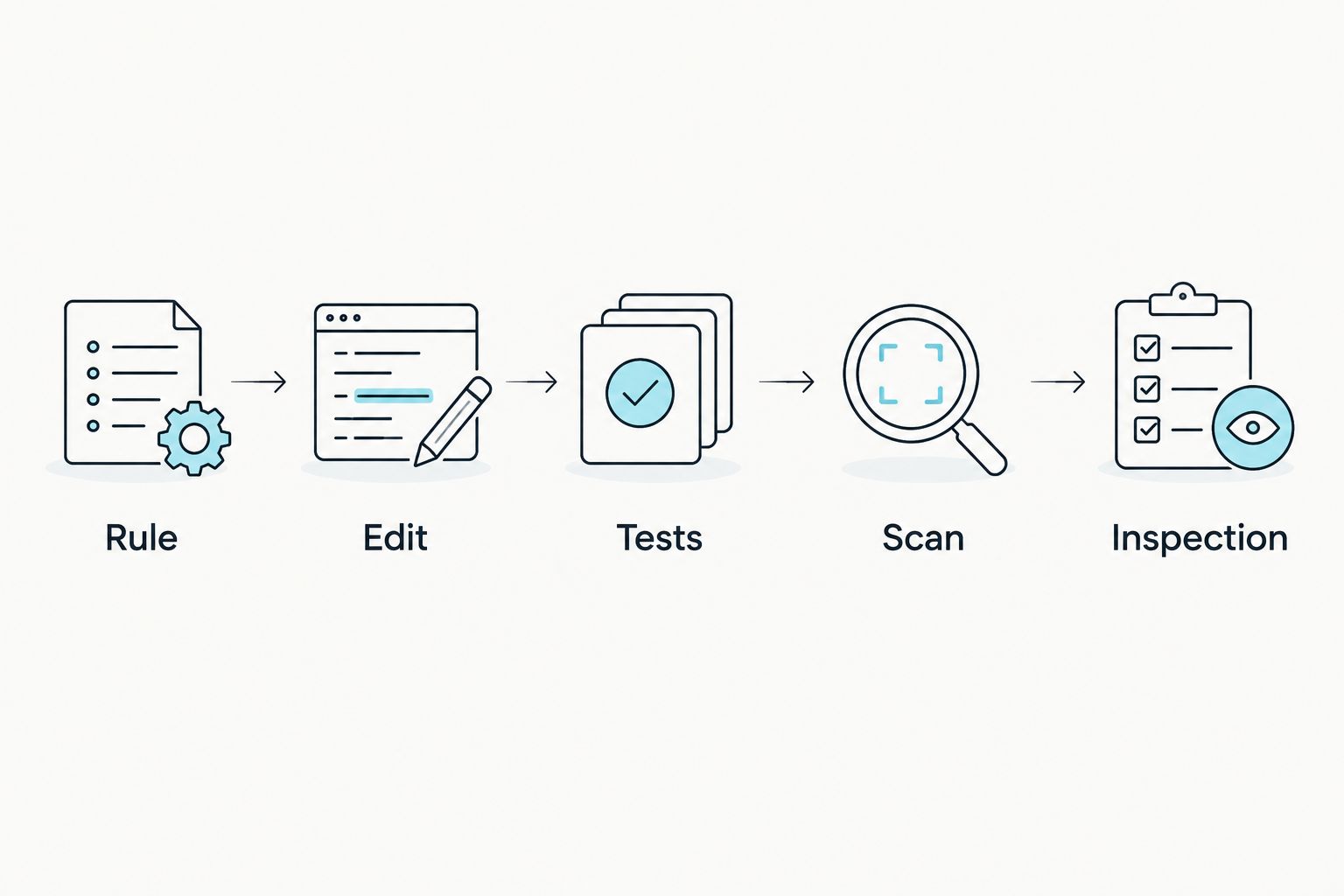
The useful handoff is concrete: rule, edit, tests, scan, inspection. Keep each part visible rather than reducing the whole process to a conversational approval.
Pull-request check configuration
Connect the CI scan
- Use the project's documented CI integration to run the semantic scan for pull requests.
- Make the rule configuration available alongside the code being checked. Verify which revision of each the CI job uses.
- Open 1 validation pull request containing a deliberate rule violation. Inspect the completed check and its finding.
- Fix the violation and confirm that the updated pull request receives a new result.
- Configure the repository's merge requirements only after you have verified the check's behavior.
Expected result: The pull request exposes a check result for the revision under review, and a corrected revision receives a fresh result. A check that never ran must not be mistaken for a passing scan.
Keep the initial rollout narrow. A single understandable rule gives reviewers a clearer acceptance condition than a collection of rules whose failures nobody has classified.
When a check fails, inspect the reported behavior before asking Codex to fix it. Give the agent the finding, the relevant code, and the unchanged rule. Then review the new diff and rerun the checks.
Do not let a repair silently remove the check, weaken the rule, or replace a meaningful assertion with an empty test. Those changes alter the acceptance condition rather than satisfy it.
Second workflow: check changes to the rules themselves
Code is not the only thing that changes. A project rule can change while the implementation stays the same. That deserves its own validation path.
For a 2026 rule-update workflow, keep the compliant and violating examples available as review material. Reuse them whenever the requirement changes.
- Explain why the existing rule no longer describes the intended behavior.
- Edit the rule separately from unrelated implementation changes.
- Run the revised rule against both examples.
- Inspect existing findings again under the new requirement.
- Review the rule diff as an acceptance-contract change.
Expected result: The updated rule distinguishes the newly intended behavior from the behavior you still prohibit.
A rule change can legitimately make an old finding disappear. The review question is whether the new requirement justifies that result. Do not accept the disappearance alone as evidence that the implementation improved.
Perch checks versus Codex self-review
Asking Codex to review its own changes is the main alternative. It gives you another conversational review pass without first defining a committed project rule. That is useful, but it is a different workflow.
| Workflow | Best for | Useful output | Limitation |
|---|---|---|---|
| Perch semantic checks | Repeating explicit project-rule checks across pull requests | Findings tied to configured behavioral requirements | Requires clear rules, appropriate scope, and inspection of findings |
| Codex self-review | Exploring a diff and requesting an explanation of possible mistakes | A review response shaped by your prompt and supplied context | A review response alone does not establish a required CI acceptance check |
Use the workflows for different jobs. Ask Codex to explain the change and inspect possible mistakes. Use Perchscan's semantic code linter to check the committed behavioral requirements.
Neither workflow replaces execution-based tests. A rule about error propagation and a test that exercises a failing request provide different evidence. Keep both when the behavior warrants both.
The trade-off is maintenance. Explicit rules require ownership, scope decisions, and review when requirements change. Conversational review requires a useful prompt and careful inspection of the answer. Neither removes the need to understand the diff.
Troubleshooting
The scan finishes without finding the deliberate violation
Confirm that the intended rule is enabled and that the configured scope includes the violating code. Then inspect the example: does the caller actually treat the return as success? A catch block alone does not establish swallowed-error behavior.
The scan flags the compliant example
Read the rule literally against the implementation. An omitted exception or an unclear caller contract can make the intended behavior ambiguous. Clarify the rule or inspect the finding; do not disable the check merely to obtain a clean result.
Local and pull-request results differ
Compare the checked revision, rule text, configured scope, and installed release. Reproduce the CI invocation locally using the documented setup. Resolve those differences before treating the result as a disagreement about the code.
The pull request shows no completed check
Inspect whether the CI job started and whether the scan completed. Separate a missing or failed job from a completed scan with no findings. Configure merge requirements against the actual check only after the validation pull request proves it runs.
Codex fixes the finding by changing the rule
Review the rule diff separately. If the requirement still stands, restore it and ask for an implementation fix. A weaker requirement is not evidence that the original violation was repaired.
Customize your workflow
Expand your 2026 setup by adding another behavior only after the first rule has a verified pass and failure path. Choose rules from concrete review disagreements or recurring project requirements, not a generic wish list.
For each new rule, name an owner, define the relevant code scope, and retain examples that explain its intent. Review rule changes alongside code changes. Keep coming-soon cloud features outside the working dependency chain.
Perchscan provides the semantic-checking component; your repository supplies the acceptance policy. Decide which findings require an implementation fix, which require rule clarification, and who can approve an exception.
FAQ
What's a code linter for Codex supposed to check?
A semantic code linter for Codex checks code against behavioral requirements, including plain-English project rules. Perch supports this workflow alongside checks for bugs and security issues.
How do I start using Perch with Codex?
Install the open-source linter using its current documented instructions, complete a baseline scan, and configure one narrow project rule. Verify the rule with compliant and deliberately violating code before relying on it in pull requests.
Is Perch better than asking Codex to review its own changes?
The workflows serve different purposes. Codex self-review gives you a conversational review pass; Perch checks configured project rules through a repeatable scan and pull-request workflow.
Can a passing semantic check replace my tests?
No. A passing semantic check does not establish that the implementation is correct, and it does not replace tests that execute the relevant behavior.
What should I do when a Perch check fails?
Inspect the finding against the implementation, caller contract, and rule text. Fix a confirmed violation, clarify an ambiguous rule, or investigate an incorrect interpretation before rerunning the check.
Do I need Perch Cloud for the first scan?
Use the available open-source functionality for the first scan. Features marked coming soon should not become dependencies of your local or CI setup.
How do I know my pull-request check is working?
Open a validation pull request with a deliberate rule violation and inspect the completed finding. Correct the violation, confirm a fresh result, and only then configure the check as a merge requirement.
One last thing
Test the check before you trust the check. A clean scan is useful only after you have established that the configured rule recognizes a violation you actually care about.
Keep the smallest clear violating example with your rule's review material. When the rule, scope, or scan setup changes, use that example to verify the acceptance path again.