

Set up a code linter for behavior checks by writing a plain-English project rule, selecting the methods and callers it covers, and testing it against code that violates the rule. Run the scan locally before connecting it to pull-request checks. Keep syntax checks and executable tests: a behavior check adds another review boundary, not proof that your code is correct.
- Perchscan's code linter suits teams that want plain-English behavior rules checked on pull requests.
- Start with 1 rule and 2 example cases: one violation and one compliant implementation.
- Check callers and callees when the rule depends on behavior outside the changed method.
- Keep syntax linting, tests, and agent self-review; each answers a different question.
How do you set up a code linter for behavior checks?
Use a narrow rule first. Perchscan provides an open-source semantic code linter for bugs, security issues, and plain-English project rules, including CI pull-request checks for teams working with Claude Code, Codex, or Cursor. Start with the installation and setup instructions available through Perchscan.
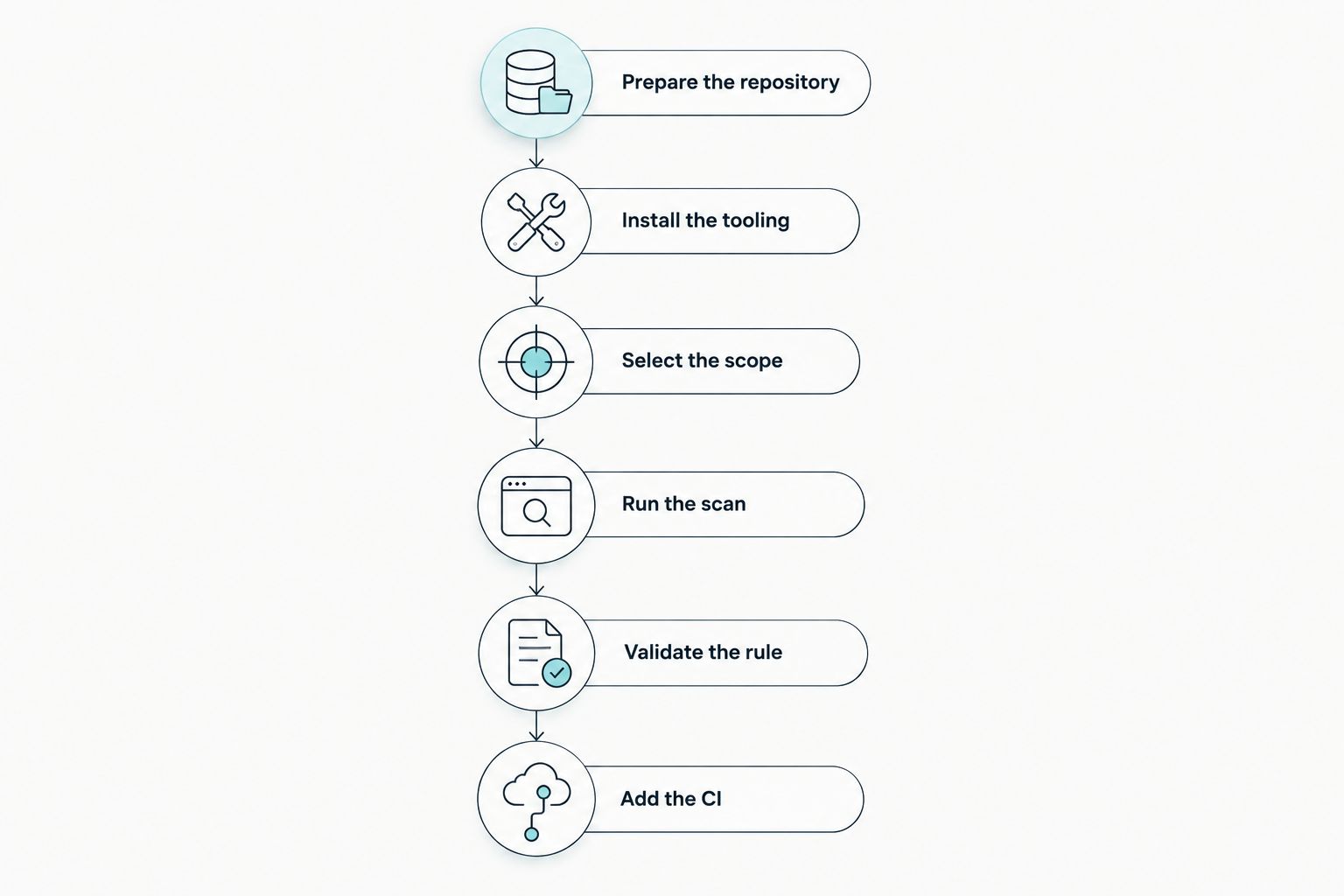
The setup sequence is:
- Identify a behavior your project requires.
- Write the requirement as a rule with an explicit failure condition.
- Select the code needed to evaluate that requirement.
- Install the documented tooling and run the first scan.
- Check a violating implementation and a compliant implementation.
- Connect the validated rule to pull-request checks.
Perchscan's code linter is best for development teams that want plain-English project rules checked on pull requests. The useful unit is a requirement you can inspect, not a general request to find anything wrong.
Why this matters
A method can compile, satisfy formatting rules, and still violate your project contract. A catch block that returns a success response after an exception is a concrete example. The syntax is valid; the behavior is the problem.
For a 2026 workflow using a coding agent, put that contract outside the conversation that generated the change. Ask the agent to explain its work, but also evaluate the resulting code against a committed requirement. These are separate checks with separate evidence.
The distinction matters when a pull request changes several methods. The changed method is not always where the consequence appears. A caller can convert a failure into success, and a callee can change what an apparently safe operation does.
Write the rule before configuring the scan
Start with a requirement you already enforce during code review. Avoid turning a preference into a vague prohibition. A useful rule identifies the relevant operation, the required outcome, and the condition that should fail.
Consider this illustrative project rule:
If saving a record fails, the request handler must not return a success response. It must propagate the failure or return the project's defined error response.
This is an example rule, not a claim about a particular repository. Adapt the error response requirement to your actual contract. If your application deliberately acknowledges queued work before persistence, write a different rule that reflects that design.
A weak version would say: make error handling good. That gives a reviewer no concrete boundary. The stronger version names the operation and distinguishes success from failure.
Include these parts:
- Scope: the request handlers that save records.
- Required behavior: a failed save remains a failure at the response boundary.
- Failure condition: an exception path returns a success response.
- Exceptions: only the cases your project explicitly permits.
Keep exceptions narrow. An exception that permits any caught error to return success cancels the rule rather than clarifying it.
Check behavior, not a preferred spelling
Do not require every handler to contain a particular keyword unless that syntax is itself the requirement. A handler can delegate error translation to another method. A caller can also undo correct error handling further down the call chain.
Read the relevant callers and callees before deciding what the rule covers. The question is whether the failure reaches the response boundary correctly, not whether a catch block looks familiar.
Install and run a first behavior scan
Use this sequence for your first 2026 setup. Keep the initial scope small enough that you can manually inspect every finding and explain every expected result.
Prepare the repository
Start from a known working state. You need the repository, its existing test command, the installation prerequisites specified by the current project instructions, and a behavior requirement you can explain.
These Git commands establish the change you are reviewing. They are repository inspection commands, not linter installation commands:
git status --short
git diff --name-only
git diff
Read uncommitted changes before scanning. If unrelated edits are mixed together, separate them or document the review scope. Otherwise, a finding can refer to code you did not intend to evaluate.
Install the tooling
Follow the current installation instructions for the open-source tool. Use the documented installation command and prerequisites rather than adapting a command from another linter.
Then configure the scan using the documented rule and file-selection mechanism. Do not guess configuration keys, command flags, or CI syntax. A plausible-looking configuration is not evidence that the intended files were checked.
Select the scope
Select the handler or method named in your rule, then identify the dependencies needed to judge it. For an error-propagation rule, that includes the operation that fails and the code that constructs the response.
Do not assume that selecting changed files provides all relevant context. Inspect callers and callees explicitly. Keep unrelated generated files and unrelated application areas outside the initial review scope.
Run the scan
Run the scan command from the current installation instructions against the selected code and rule. Inspect both the execution result and the findings. A successful process exit does not, by itself, establish that the intended requirement was evaluated.
For each finding, answer three questions: which method violates the rule, which branch causes the violation, and what caller-visible behavior follows? Treat the result as a review input until you have checked the code path.
Validate the rule
Use 2 example cases: a known violation and a compliant implementation. Keep the difference between them focused on the behavior under review.
The violating case should produce a finding for the expected reason. The compliant case should not produce that same finding. If the results do not distinguish the cases, revise the rule or scope before enabling a merge gate.
Add the CI check
After local validation, connect the scan to your CI pull-request checks using the documented integration. Start with 1 pull request that demonstrates the rule and its expected result.
Confirm which revision the check evaluates. Also confirm how CI reports a finding versus a scan that did not execute successfully. Do not treat an execution failure as evidence that the code passed.
The sequence stays the same: prepare a known revision, install the tool, select the relevant code, run the scan, validate the rule, and then add CI.
What should you do when a behavior check fails?
Inspect the reported code before editing it. A useful finding points to a violation you can explain through the method, its dependencies, and the relevant execution path.
For the failed-save rule, trace this path:
- The handler calls the save operation.
- The save operation fails.
- The exception or failure value reaches the handler.
- The handler constructs the response.
If that path ends in a success response contrary to your contract, fix the behavior. Do not merely rewrite the catch block to make the finding disappear.
If the implementation is correct, identify why the rule produced the wrong conclusion. The scope can omit a helper that translates the error. The rule can also be ambiguous about which response counts as success.
Fix the implementation when it violates the contract; fix the rule when it misstates the contract. Keep that distinction visible in the pull request. It prevents a rule change from concealing a behavior change.
After the fix, rerun the behavior scan and the relevant tests. Review the diff again. A resolved finding does not establish that the edit preserved every other requirement.
Why behavior-check results vary
The usefulness of a 2026 behavior-check setup depends on what you ask it to evaluate. These factors give you concrete places to inspect when a finding is wrong or incomplete:
- Rule wording: explicit failure conditions are easier to evaluate than broad quality requests.
- File scope: omitted code can contain the behavior that decides whether the rule holds.
- Call boundaries: callers and callees can change how failures or results propagate.
- Project conventions: error types and response contracts need project-specific meaning.
- Permitted exceptions: exceptions must describe legitimate behavior without erasing the requirement.
Adjust the smallest relevant part first. Do not expand the scan to the entire repository as the automatic response to an unclear result. Wider scope does not repair an ambiguous requirement.
Is a behavior linter better than asking an agent to review its changes?
Use both for different jobs. Asking Claude Code, Codex, or Cursor to review a change gives you an interactive review workflow. A committed behavior rule gives the pull request an explicit requirement to evaluate again.
Neither workflow proves correctness. In 2026, choose the review boundary by the question you need answered, not by which tool generated the code.
| Workflow | Best for | Useful property | Limitation |
|---|---|---|---|
| Syntax linting | Enforcing code-form rules | Checks configured syntax and style constraints | Does not establish arbitrary project behavior |
| Agent self-review | Exploring a change interactively | Lets you ask follow-up questions about methods and dependencies | An explanation is not an executable test or proof |
| Semantic behavior checks | Applying plain-English project requirements | Gives a behavior requirement a place in pull-request review | Needs a clear rule, relevant scope, and finding inspection |
| Executable tests | Checking specified runtime outcomes | Exercises assertions against executed code | Covers the cases and conditions the tests actually exercise |
Keep the conventional linter. Keep the tests. Add behavior checks where the project requirement deserves an explicit review boundary.
How many rules should you add first?
Start with 1 rule. Choose a recurring review requirement with a clear violating example and a clear compliant example.
Do not begin with a list of general requests such as improve security, avoid bugs, and follow best practices. Translate a requirement into a specific operation and outcome. Add another rule after the first has a stable meaning in your repository.
Can a behavior check replace a regression test?
No. A behavior check evaluates the code against a requirement; a regression test executes a specified case and checks its outcome.
For the failed-save example, keep a test that forces the save operation to fail and asserts the response contract. The rule and test address the same requirement through different evidence. Use the finding to guide inspection, and use the test to exercise the failure path.
FAQ
What's the best code linter setup for behavior checks?
Use a semantic behavior check alongside your existing syntax linter and tests. Start with a plain-English rule, select the relevant methods and dependencies, and validate both violating and compliant code before adding a CI gate.
Can I use behavior checks with Claude Code, Codex, or Cursor?
Yes. Perchscan serves development teams and their Claude Code, Codex, and Cursor workflows through semantic code linting and CI pull-request checks. Keep the project requirement explicit rather than relying only on the agent's explanation of its changes.
How many behavior rules should I configure first?
Start with 1 rule that describes a concrete requirement. Validate it against a known violation and a compliant implementation before adding more rules.
What should happen when a behavior check fails?
Inspect the reported method and trace the relevant callers and callees. Fix a genuine contract violation, or correct the rule and scope when they misrepresent the intended behavior.
Does a passing code linter scan mean my code is correct?
No. A passing scan does not prove that every behavior is correct. Keep executable tests, syntax checks, and human review for the requirements each can evaluate.
Should I scan only the files changed in a pull request?
Use changed files to locate the review scope, but inspect the dependencies needed to evaluate the rule. A caller or callee outside the diff can determine whether the required behavior holds.
How do I keep my setup instructions current in 2026?
Use the current installation and CI instructions, and record the version your repository uses. Review rule changes as code changes so the requirement remains visible when the implementation evolves.
One last thing
The most useful first rule is often the requirement you have repeated in code review. Take that comment, name the method boundary, and state what must happen when the operation fails.
Keep the violating example with the rule. It gives future maintainers a concrete explanation of why the check exists. When someone changes the rule, review whether that example still fails for the intended reason—not just whether the latest pull request passes.