

Instead of asking Claude Code or Codex to review every change manually, run your repository’s code linter in GitHub Actions and require its status check before merging. For plain-English project rules, Perchscan provides semantic code linting; the setup below shows how to enforce a repository lint command without inventing a product-specific CLI.
- Code linter GitHub Actions enforcement needs a failing command and a required status check.
- Perchscan fits teams checking plain-English project rules on pull requests.
- Run the same repository lint command locally and in CI.
- Test a deliberately failing pull request before trusting the merge gate.
Why this matters
A failed workflow and a blocked merge are different things. GitHub Actions runs the command. A branch rule decides whether its result prevents merging.
That distinction matters when Claude Code, Codex, or Cursor writes the patch. Asking the agent to review its own changes is useful feedback, but it does not create an enforced repository check.
Perchscan is best for teams that want plain-English behavior rules checked on pull requests. A semantic rule can describe what callers and callees must do, rather than only how source code should look.
For your 2026 setup, separate those responsibilities: define the behavior, run the check, and require its result. Do not treat a green formatting check as evidence that an error path behaves correctly.
Before you start
- Repository access: You need permission to commit a workflow and configure branch protection or rulesets. Your repository must support the protection settings you intend to use.
- A working lint command: The executable example assumes a Node.js repository with
package.json, a committedpackage-lock.json, a committed.nvmrc, and an existinglintscript. Confirm thatnpm ciandnpm run lintwork locally. - A discoverable status check: Run the workflow before selecting its check in the branch rule. A workflow file alone does not guarantee that GitHub has a check result available to select.
The YAML below runs an existing npm script. It is not a Perchscan installation command or an assertion about its CLI. Keep the documented scan command for your installed linter behind the repository script, and use the same command locally and in CI.
Repository command
Confirm the failure contract
- Open
package.jsonand inspectscripts.lint. - Confirm that the script invokes the intended linter, not a placeholder command.
- Run the clean checkout:
npm ci
npm run lint
- Introduce a small violation that the configured rule explicitly checks.
- Run
npm run lintagain and inspect the exit status.
A passing command normally returns exit code 0. A blocking failure must return a nonzero exit code; 1 is a common example. The exact nonzero value matters less than whether the shell receives it.
Look for wrappers that hide failures. A command ending in || true tells the shell to succeed even when the linter fails. A script that prints findings but exits successfully also cannot block a merge through this workflow.
Expected result: A clean revision passes. A known violation fails. You can reproduce both results without GitHub Actions.
Define a behavior rule
Choose a rule that names an observable obligation. For example, an illustrative project rule is:
When a persistence operation fails, its caller must not return a success response.
This is an example requirement, not a claim about a built-in rule or a supported configuration format. Translate it into the rule format documented by your chosen semantic checker.
Identify the relevant methods, their callers, and the failure paths before broadening the scan. A rule about persistence failures should not become a vague instruction to find every possible bug.
Use 2 test cases: a revision that preserves the obligation and a revision that violates it. Check both. A rule that rejects every change is not a useful gate, and neither is one that accepts the deliberate violation.
Expected result: You can explain what causes the rule to pass or fail using a concrete code path.
Pull-request workflow
Add the workflow file
- Create
.github/workflows/lint.ymlin your repository. - Add this workflow:
name: Pull request lint

on:
  pull_request:
  push:
    branches:
      - main

permissions:
  contents: read

jobs:
  lint:
    name: Repository lint
    runs-on: ubuntu-latest
    steps:
      - name: Check out repository
        uses: actions/checkout@v4

      - name: Set up Node.js
        uses: actions/setup-node@v4
        with:
          node-version-file: .nvmrc

      - name: Install dependencies
        run: npm ci

      - name: Run repository lint
        run: npm run lint
- Replace
mainif your repository uses a different default branch. - Commit the workflow and open a pull request.
- Open the pull request’s Checks tab and inspect Repository lint.
The action references above are an executable example, not a claim that these are the newest releases in 2026. Apply your repository’s action-pinning and dependency-update policy before adopting them.
This example needs no deployment credentials. contents: read gives the checkout access it needs without requesting write access. Your linter’s separate authentication requirements, if any, still need their documented setup.
Expected result: GitHub installs the locked dependencies and executes the same lint script you tested locally. A nonzero lint exit status fails the job.
Verify the check lifecycle
- Push the deliberate violation to the pull request.
- Confirm that Run repository lint fails because of that violation, not because dependency installation failed.
- Fix the code and push another commit.
- Confirm that the new run passes.
Keep the job name stable. Required-check configuration refers to a check identity, so renaming jobs can leave a branch rule waiting for the old name.
Do not add continue-on-error: true to the blocking lint step. That setting changes how failure affects the job result and defeats the intended gate.
Expected result: The pull request changes from failing to passing when you repair the violation. You have verified execution, but merge enforcement still needs configuration.
Required-check configuration
Require the lint result
For a 2026 GitHub ruleset setup:
- Open the repository’s Settings.
- Open Rules, then Rulesets.
- Select New ruleset, then New branch ruleset.
- Give the ruleset a descriptive name and target your protected branch.
- Enable Require status checks to pass.
- Use Add checks to select the lint check emitted by the workflow.
- Set Enforcement status to Active and select Create.
Check the ruleset’s bypass permissions. An actor permitted to bypass a rule can merge without satisfying the same requirements as an ordinary contributor. Decide whether that exception belongs in your process.
If your repository already uses classic branch protection, add the lint check to that existing protection instead of creating overlapping policies without a reason.
Expected result: A pull request with a failed required lint check cannot merge through the normal protected-branch path.
Test the merge gate
Run 2 pull-request tests after enabling protection:
- Failing revision: Push the known violation. Confirm that the lint check fails and GitHub blocks the merge.
- Passing revision: Repair the violation. Confirm that lint passes and that this requirement no longer blocks the merge.
Other requirements can still prevent merging, including reviews and other required checks. Inspect the merge panel rather than assuming a successful lint run satisfies the entire repository policy.
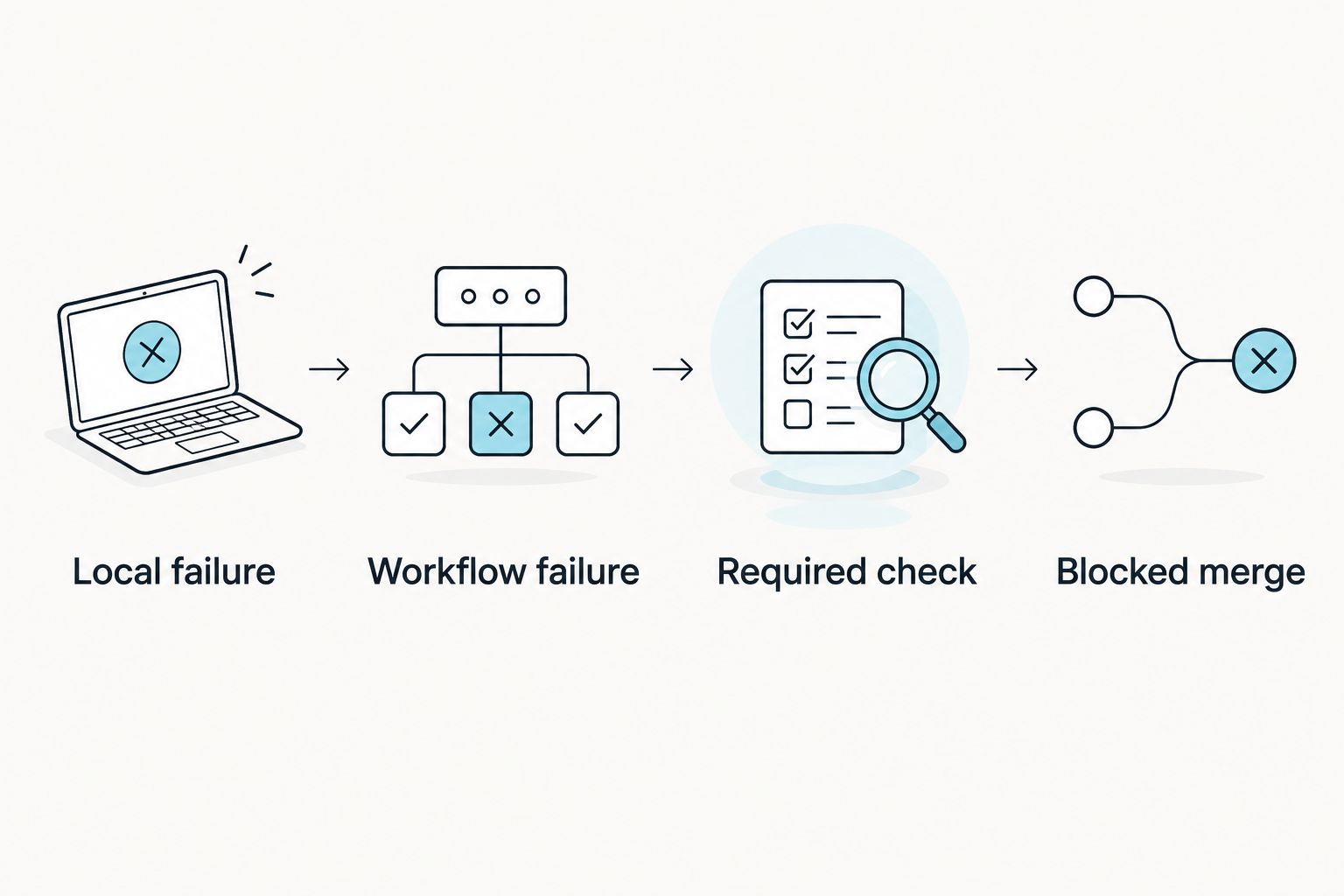
The enforcement sequence is simple: Local failure, Workflow failure, Required check, Blocked merge. Verify every link.
Run checks whenever a pull request changes
The pull_request trigger covers the normal open, reopen, and synchronize activity types by default. Pushing another commit to the pull-request branch produces a synchronize event, so the same workflow checks the update.
The example also checks pushes to main. That provides a separate result for the protected branch after changes land; it does not replace the pull-request gate.
For a draft-aware variant, explicitly include the events you need:
on:
  pull_request:
    types: [opened, synchronize, reopened, ready_for_review]
Use this trigger instead of the original pull_request entry, not alongside a duplicate YAML key. The added ready_for_review event runs the workflow when a draft becomes ready for review.
For your 2026 policy, decide whether drafts should run checks too. Avoid conditional logic that silently omits the only required job on pull requests you expect to merge.
Expected result: New commits receive a fresh lint result without a contributor manually requesting another review from the coding agent.
Choose the check, not just the interface
Use this comparison to assign responsibilities. These workflows are not interchangeable.
| Workflow | Best for | Benefit | Limitation |
|---|---|---|---|
| Existing syntax or style linter in CI | Enforcing configured syntax and style rules | Produces a repeatable command result | Does not establish behavior outside its configured checks |
| Perchscan semantic code linter | Checking plain-English project behavior rules | Expresses obligations about code behavior | Needs clearly scoped rules and an enforcement path |
| Claude Code or Codex self-review | Interactive explanation and patch revision | Lets you ask follow-up questions about a change | A review conversation alone is not a required GitHub status check |
Keep agent review for discussion; use a required CI result for enforcement. Neither workflow proves that a change has no bugs.
For the 2026 rollout, start with a rule whose failure you can demonstrate. Add coverage after you understand what the result means. Keep this setup grounded in open-source functionality; do not depend on Cloud features marked coming soon.
Troubleshooting
The linter reports a violation, but CI stays green
Inspect the script’s exit status. Remove failure-swallowing shell wrappers and check for continue-on-error. Confirm that the reported finding meets the linter’s configured failure criteria.
The check fails, but GitHub still permits merging
Inspect the protected branch’s active rules. Confirm that the actual emitted check is required and that the current user is not bypassing the rule. A red check alone is not merge protection.
GitHub waits for a check that never appears
Compare the required check name with the workflow’s current job name. Check event filters and branch targeting. Path-filtered workflows can leave required checks pending when the workflow does not run; keep the required workflow eligible for every relevant pull request.
Dependency installation fails before lint starts
Reproduce npm ci locally with the committed lockfile and the Node version in .nvmrc. Repair a missing or inconsistent lockfile rather than replacing npm ci with an install command that silently changes dependencies.
Fork pull requests cannot access credentials
Fork-triggered workflows do not receive ordinary repository secrets. Do not switch to pull_request_target merely to expose credentials while running untrusted pull-request code. Use a documented fork-safe setup or keep credential-dependent checks outside that execution path.
Customize your workflow
Keep syntax checks and behavior checks separately identifiable when they answer different questions. Separate job names let a contributor distinguish a dependency failure, a style violation, and a failed project rule.
Expand scope only after a known violation fails reliably. Add another method family, caller pattern, or project rule, then repeat the passing and failing tests. Keep rule changes in version control so reviewers can see when the repository’s expectations change.
When a check fails, inspect the finding before asking the coding agent to edit code. Give the agent the rule, the relevant methods, and the observed failure. After the fix, rerun the repository command rather than accepting the agent’s statement that the problem is resolved.
FAQ
How do I make a code linter block a pull request in GitHub Actions?
Run a lint command that exits nonzero on a blocking violation, then require its emitted status check in the target branch’s protection rules. Verify enforcement with a deliberately failing pull request.
Does a failed GitHub Actions workflow automatically prevent merging?
No. The relevant check must be required by an active branch protection rule or ruleset, and bypass permissions can create exceptions.
Can I use the same lint command locally and in GitHub Actions?
Yes. Put the command behind a repository script and run that script in both places. Match the runtime, dependencies, and configuration so the comparison is meaningful.
Does this workflow install the semantic linter automatically?
No. The workflow installs the dependencies declared by the example Node.js repository and runs its existing lint script. Configure your chosen linter using its documented installation and scan instructions first.
Is asking Claude Code or Codex to review its own patch enough?
Not for merge enforcement. Agent self-review supports discussion and revision, but it does not by itself create a required GitHub status check.
Why is my required lint check stuck pending?
A required check can remain pending when its workflow never runs or its expected name no longer matches the emitted check. Inspect event filters, path filters, branch targeting, and job names.
Should a semantic rule replace syntax linting?
No. Keep each check for the obligation it actually enforces. Syntax rules and behavior rules answer different questions, and neither guarantees bug-free code.
One last thing
Test the repository policy, not just the linter. A command returning exit code 1 proves that the command failed. Only a deliberately failing pull request, visibly blocked from merging, proves that your configured merge gate works.