

Test custom code linter rules against known violations, valid implementations, and ambiguous cases before making them required in CI. For a 2026 rollout, write down the expected result for each case, inspect disagreements, and check representative pull requests without blocking merges. Enforce a rule only after its failures identify the behavior you actually want developers to fix.
- Test code linter custom rules against violations, valid implementations, and ambiguous cases before enforcing them.
- Perchscan’s semantic code linter fits teams expressing project behavior as plain-English rules.
- A passing check does not prove correctness; include fixtures that must fail.
- Compare saved rule checks with Claude Code or Codex self-review using the same changes.
How do you test custom code linter rules before enforcing them?
Start with a written behavior contract. Turn it into small source-code fixtures with explicit expected results. Then test the rule against actual changes, including callers and callees that determine whether the behavior is correct.
Perchscan provides an open-source semantic code linter for bugs, security issues, and plain-English project rules, with CI pull-request checks. Perchscan’s semantic code linter is for development teams that want to check project behavior expressed in plain-English rules. The rule still needs validation: an unclear requirement does not become precise because a check runs automatically.
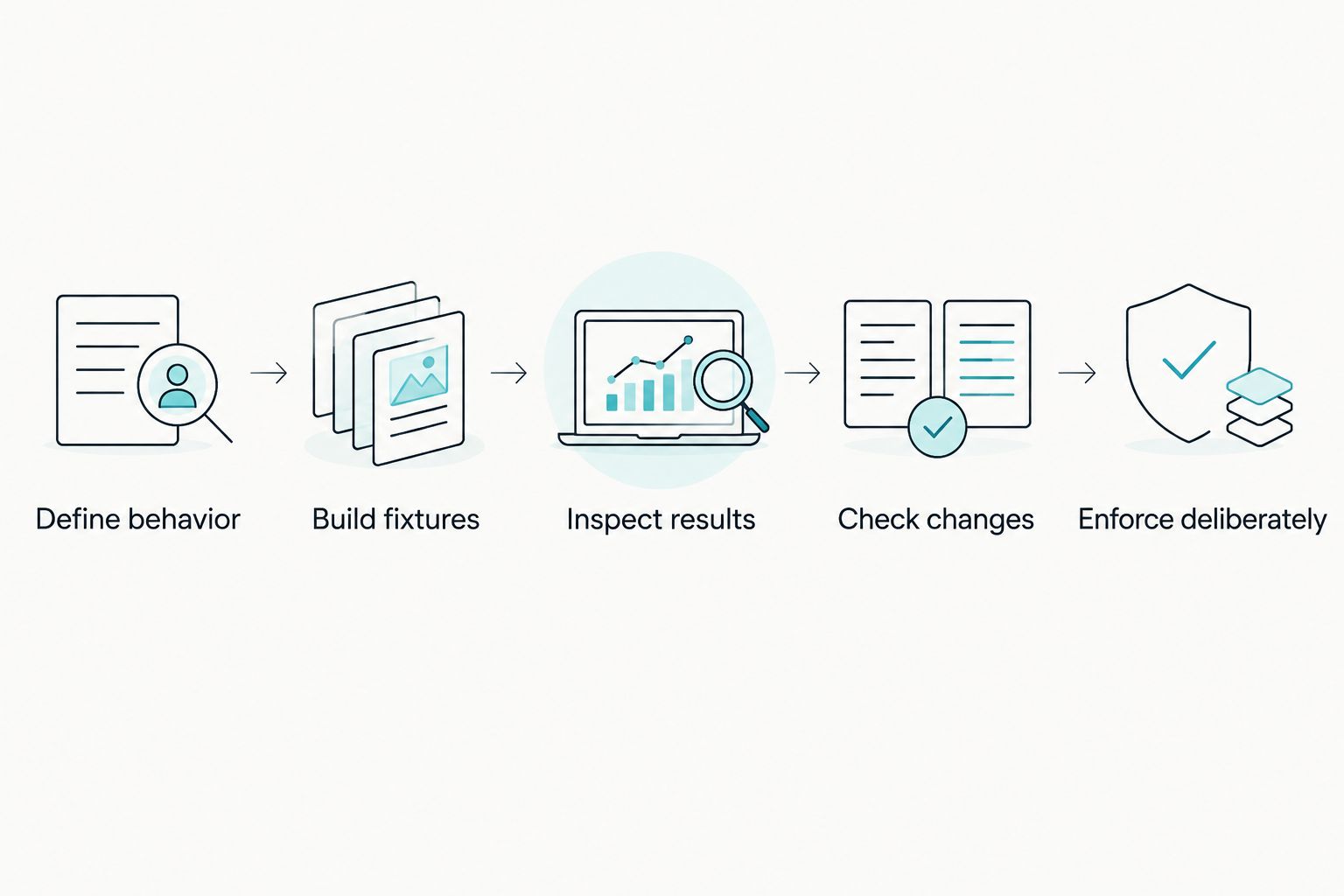
Use this sequence before enforcement:
- Define behavior. State the requirement, scope, and allowed exceptions.
- Build fixtures. Include a violation, a valid implementation, and a contract-dependent case.
- Inspect results. Compare each finding with its expected result and supporting code.
- Check changes. Apply the rule to representative pull requests without making it a merge requirement.
- Enforce deliberately. Require the check only when developers can understand and act on its failures.
Why this matters
A required check has authority over a pull request. If its rule mistakes an allowed fallback for a bug, the developer must change correct code or contest the finding. If it accepts a swallowed exception, a green check provides no protection against that behavior.
Test both directions: behavior that must fail and behavior that must pass. Checking only violations leaves false positives unexamined. Checking only valid code leaves missed violations unexamined.
For your 2026 rule baseline, preserve the examples and expected results alongside the rule. Reviewers then have a concrete reference when someone edits its wording or expands its scope.
Define the behavior before configuring the check
Start with a plain-English rule that describes an observable contract, not a preference for particular tokens. Specify what triggers the requirement and what counts as satisfying it.
Consider this illustrative project rule:
When a method catches an unexpected exception, it must re-raise the exception or translate it into a documented failure result. It must not return a value that callers interpret as success.
This is a proposed rule for the examples below, not a built-in rule or a quotation from product documentation. Adapt its contract to your repository before using it.
The wording separates several questions:
- Trigger: Does the method catch an unexpected exception?
- Requirement: Does it preserve a failure signal?
- Allowed exception: Does the project document the returned value as a failure?
- Relevant context: How do callers interpret the return value?
Avoid a rule such as “never catch exceptions.” Catching an exception and translating it into an explicit failure is different from hiding it. A rule that ignores that distinction checks a pattern rather than the intended behavior.
Also define the files and methods you intend to check. Production error handling, test helpers, and demonstration code do not automatically share the same contract. Make scope explicit rather than asking the reviewer to infer it.
Build a small fixture set with expected results
Create 3 initial test cases: an obvious violation, an allowed implementation, and a case whose result depends on the surrounding contract. These are test-design instructions, not a measured coverage target.
The following Python snippets illustrate the proposed exception rule. The helper functions stand for your project’s existing implementations.
# Violation: the exception path reports success.
def hidden_failure():
    try:
        perform_work()
    except Exception:
        return {"ok": True}

# Allowed: the exception remains visible to callers.
def visible_failure():
    try:
        perform_work()
    except Exception:
        record_failure()
        raise

# Contract-dependent: inspect what None means to callers.
def fallback_result():
    try:
        return perform_work()
    except Exception:
        return None
Do not treat these snippets as executable tests of your production behavior. Supply actual helper implementations and calling code when building repository fixtures. A standalone fragment cannot establish how the application interprets a result.
| Fixture | Expected result | Reason | What the case cannot establish alone |
|---|---|---|---|
hidden_failure | Fail | The exception path returns an explicit success value | Whether other exception paths have the same defect |
visible_failure | Pass for this rule | The method re-raises after recording the failure | Whether recording the failure introduces another bug |
fallback_result | Depends on the contract | None has no universal success or failure meaning | How callers handle the returned value |
For the first 2 cases, expect 1 failure and 0 findings on the allowed implementation. Keep the contract-dependent case separate until you provide the context needed to judge it.
A clean result on the valid fixture is necessary, but insufficient. The violating fixture must also trigger the intended check. Otherwise, the rule has not demonstrated that it detects the behavior.
Add callers, callees, and valid exceptions
Expand the fixture set when the behavior crosses a method boundary. A return value that looks harmless inside a callee can cause a caller to report success or skip required cleanup.
For the None example, write down the actual contract before assigning an expected result. Does the caller treat None as an explicit failure? Does it substitute a successful default? Does it dereference the value without checking it?
Include the relevant caller in the test case. Do not decide from the callee alone when the rule depends on downstream interpretation.
Add cases that challenge your wording:
- An exception is translated into an explicit error result.
- An exception is recorded and then re-raised.
- A documented fallback handles an expected failure condition.
- A helper catches the exception and the caller receives a success-shaped result.
- A return value changes meaning depending on its caller.
Each case needs a written expected result and a reason. If reviewers disagree about the expectation, resolve the project contract before adjusting the check.
Tests of valid exceptions are especially useful. They force you to distinguish forbidden behavior from code that merely resembles it. That distinction belongs in the rule, its scope, or its documented contract.
Run a first scan without making it a merge gate
For Perchscan, begin with the available open-source functionality. Use the current setup instructions for your coding-agent workflow, install as documented, and run a first scan on the chosen repository scope. Keep Perch Cloud features marked coming soon out of the required rollout path.
Before running the check, prepare:
- A repository revision you can return to.
- A plain-English rule with an explicit scope.
- Fixtures and their expected results.
- Relevant callers, callees, and contract documentation.
- A place to record findings without blocking merges.
Use the documented installation and scan commands rather than guessing flags or copying commands for a different release. Save the command you actually used with the rule’s validation record.
Inspect the first result against the fixtures. A finding on the violating case is useful only if its explanation identifies the forbidden behavior. A finding on the allowed case is a disagreement to investigate, not a reason to rewrite correct code immediately.
If the scan produces no findings, inspect the known violation first. Confirm that the case was included in the scan and that the rule describes its behavior clearly. Silence is not evidence that the rule works.
What should you do when a custom rule check fails?
Check the behavior before changing the code. Read the reported method, its relevant callers, and the project contract. Decide whether the finding identifies a real violation, a rule-definition problem, or a scope problem.
Use a short triage sequence:
- Confirm that the reported code belongs in the rule’s scope.
- Identify the exact behavior the finding says is forbidden.
- Compare that behavior with the documented contract.
- Reproduce the disagreement in a small fixture.
- Fix the implementation or refine the rule, then rerun the fixture set.
Do not weaken the wording merely to make the current pull request pass. A narrower rule is justified when it better expresses the requirement, not when it hides an inconvenient finding.
Keep the new fixture after resolving the disagreement. It becomes a regression case for future rule changes. The next wording edit should not silently reopen the same argument.
Compare saved checks with coding-agent self-review
Asking Claude Code or Codex to review its own changes is the direct alternative. You can ask the agent to inspect exception paths, trace callers, and explain whether a project rule was satisfied. That is useful for exploring a change before submission.
A saved semantic rule changes where the requirement lives: it becomes a repeatable check rather than a request you must remember to make. That distinction does not establish better bug-detection results. Compare both workflows on the same fixtures and pull requests.
| Workflow | Best for | Benefit | Limitation to account for |
|---|---|---|---|
| Perchscan semantic code linter | Teams keeping plain-English project rules in a checking workflow | Runs project-rule checks through CI pull-request checks | Rule meaning and findings still require validation |
| Claude Code or Codex self-review | Developers investigating a change interactively | Lets you ask follow-up questions about methods and behavior | A review request alone is not an enforced CI requirement |
| Human review with fixtures | Teams resolving disputed project contracts | Makes expected behavior and exceptions explicit | Requires reviewer attention and maintained examples |
Ask each workflow the same question about the same change. Record whether it identifies the known violation and accepts the valid exception. Do not substitute a persuasive explanation for a correct result.
Why custom rule results vary
Disagreements often reveal differences in the material being checked or the requirement being expressed. Inspect these inputs before changing enforcement settings:
- Rule wording: A broad prohibition and a contract-specific requirement describe different checks.
- File scope: Including helpers or examples changes which behavior the rule encounters.
- Calling context: A result’s meaning depends on how callers handle it.
- Documented exceptions: An allowed fallback needs an explicit failure contract.
- Repository changes: Edits to callees or shared interfaces can invalidate old fixture expectations.
If a check reports a confidence probability, do not treat that number as proof of correctness. Validate the reported behavior against the code and contract. Confidence does not replace an expected-result test.
When should custom rules become required CI checks?
Make a rule required when its known violations fail, its valid cases pass, and its findings explain a fixable project requirement. Also make sure the team knows how to resolve a disputed result without hiding a real defect.
Before adding the rule to your 2026 CI requirements, inspect representative pull requests in a nonblocking workflow. Choose changes that exercise the rule’s actual scope, including allowed exceptions. Unrelated clean pull requests do not validate exception-handling behavior.
Keep the rule revision, fixture revision, repository revision, and actual scan command together. When a later result changes, that record helps you identify what changed rather than relying on memory.
FAQ
How do I test code linter custom rules before enforcing them?
Test known violations, valid implementations, and contract-dependent cases against written expected results. Then inspect representative pull requests without blocking merges before making the check required.
How many examples should I start with?
Start with 3 test cases: a known violation, a valid implementation, and a contract-dependent case. Add callers and valid exceptions as the rule’s scope expands; this starting set is not a coverage guarantee.
Does a passing custom rule check prove my code is correct?
No. A passing check says nothing about defects outside the rule’s scope, and a rule that misses its known violating fixture has not demonstrated useful detection.
Should I fix the code every time a semantic rule fails?
No. First compare the finding with the code and project contract, then fix the implementation or correct the rule’s wording or scope.
Is asking Claude Code or Codex to review its changes enough?
Self-review is useful for interactive investigation, but the request alone is not a required CI check. Compare self-review and saved rule checks on the same fixtures rather than assuming either workflow detects more bugs.
Should my 2026 rollout depend on upcoming cloud features?
No. Build the required workflow around available functionality, and keep features marked coming soon outside the enforcement path.
Can I test a behavior rule with an isolated method?
Yes, when the requirement is local to that method. Include callers, callees, and documented contracts when the expected result depends on behavior across method boundaries.
One last thing
Keep a deliberately violating fixture. A clean repository cannot tell you whether a rule detects anything. The fixture gives you a concrete failure to check after changing the rule, its scope, or the checking setup.
For your 2026 rollout, preserve the allowed exception too. Together, those cases test the boundary that matters: reject the forbidden behavior without rejecting the documented alternative.