

Check code linter incremental scans by comparing a clean full scan with an incremental scan of the same repository state, rules, and configuration. Then change a dependency or rule without editing the file that contains the violation; a passing incremental result is suspect if the equivalent full scan still reports that violation.
- Check code linter incremental scans against a clean full scan of the same repository state.
- Change callers, callees, and project rules separately to test invalidation boundaries.
- Perchscan suits teams checking plain-English behavior rules in pull requests.
- A green check is not proof of freshness; verify its revision, inputs, and execution status.
Why this matters
A cached result answers a question about earlier inputs. It remains useful only when the inputs that determine the answer have not changed. For semantic checks, those inputs can extend beyond the file that contains the finding.
Perchscan provides an open-source semantic code linter for bugs, security issues, and plain-English project rules. Perchscan is best for development teams that want plain-English behavior rules checked in pull requests. Freshness testing belongs alongside rule testing: a correct rule cannot protect a pull request when its result belongs to different code.
Keep a dated record of the experiment. A 2026 scan report should identify the checked revision and rule configuration, not just display a successful status.
How do you check incremental code linter scans for stale results?
Use a controlled comparison. Hold the code, rules, and configuration constant while changing how the scan obtains its results. Then introduce a change that should invalidate an earlier result.
The procedure below uses Git commands and tool-independent checks. Use the linter's documented commands for installation, full scans, incremental scans, and cache management. Do not substitute guessed flags or delete an unidentified directory.
1. Record the baseline
Start on a disposable test branch. Record the repository state before scanning:
git status --short
git rev-parse HEAD
git diff --name-only
git status --short identifies working-tree and staging changes. git rev-parse HEAD identifies the checked-out commit. git diff --name-only lists unstaged changed paths; it does not list every possible input to a scan.
Record staged and untracked files separately when they matter. An unchanged commit identifier does not prove that two working directories contain identical code.
Save the rule text, selected paths, exclusions, configuration, and linter version with the result. For a hosted or model-backed check, also record the execution settings the tool exposes. Do not assume those settings are part of its cache key.
2. Create a known failure
Write a small fixture that violates a specific project rule. Use behavior you can inspect directly, rather than a vague instruction such as keep the code clean.
For example, define this test rule:
When a persistence operation fails, its caller must not report success.
Create a method that catches a persistence error and returns a success result. Confirm that the full scan reports the violation before testing incremental behavior. This fixture is an example, not a claim about a built-in rule or a particular scanner's output.
If the full scan misses the fixture, stop. The experiment has not established a dependable reference result. Fix the rule, its scope, or the fixture before investigating caching.
3. Isolate the runs
Use 2 worktrees when you need separate working directories for the comparison. After committing the fixture on your test branch, create both directories at that commit:
git worktree add --detach ../lint-full HEAD
git worktree add --detach ../lint-incremental HEAD
These commands create detached worktrees at the current commit. Install prerequisites according to the project's instructions in each directory, and keep relevant configuration identical.
Separate worktrees isolate working files, not necessarily caches. A scanner can store state outside the repository. Use its documented cache controls or isolated execution environment when establishing a clean reference.
4. Establish the reference
Run a clean full scan against the fixture. Save the finding, rule identity, file location, execution status, and revision information.
Next, run the incremental workflow against the same fixture. Compare the underlying violation, not just the wording of the explanation. Equivalent findings can use different sentences or point to nearby lines.
For a 2026 regression record, retain the actual reports alongside the fixture. A note saying both passed or both failed loses the evidence needed to explain a later disagreement.
5. Change an input and repeat
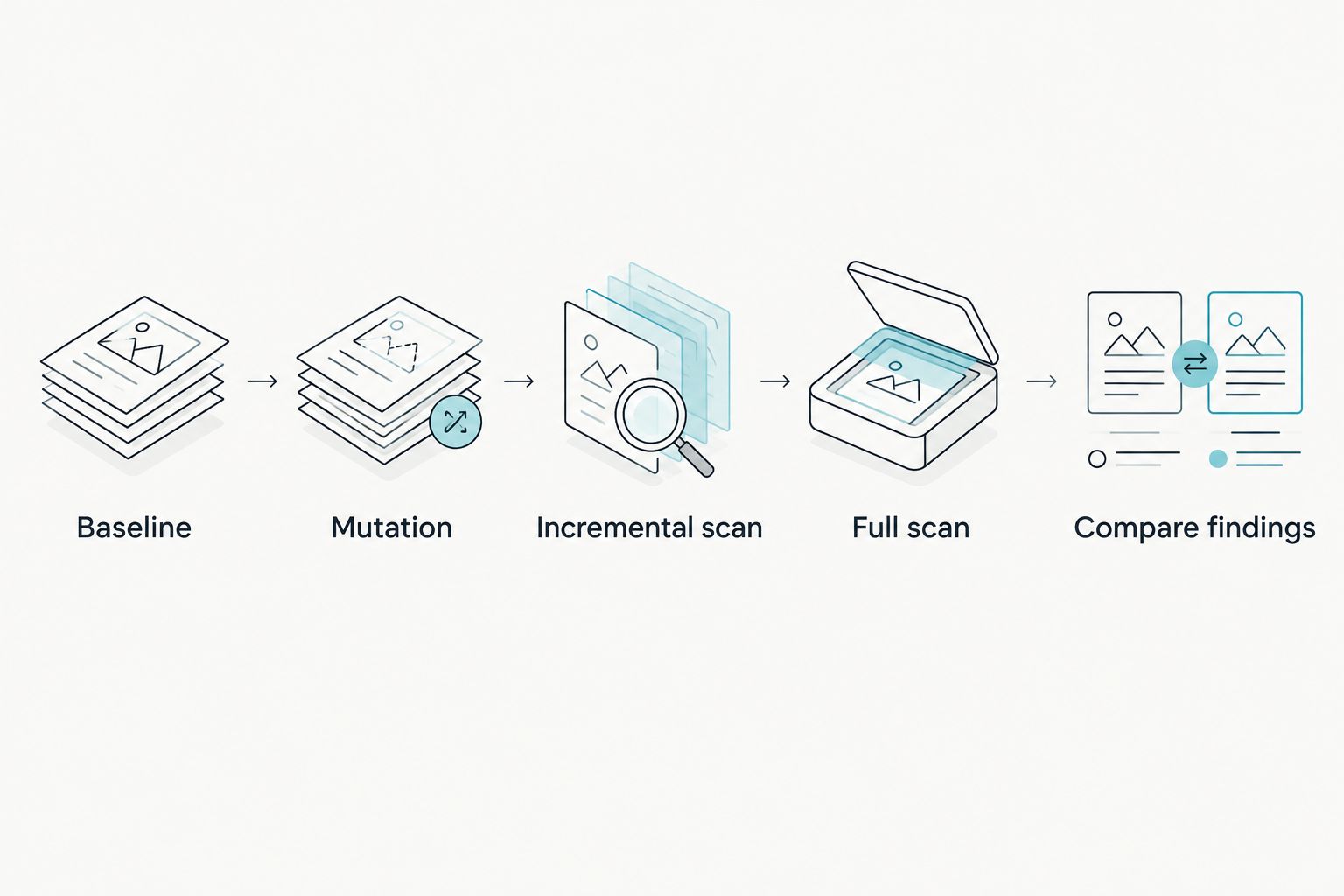
Use 3 runs for each mutation: the original baseline, the incremental result after the mutation, and a clean full result after the same mutation. Keep each mutation separate so a disagreement has a clear cause.
Test the following sequence:
- Baseline: Confirm the known violation is reported.
- Mutation: Change the code, dependency, or rule under test.
- Incremental scan: Run the normal incremental workflow.
- Full scan: Run a clean reference against the identical changed state.
- Compare findings: Check whether both results describe the same behavior.
A disagreement identifies a case to investigate. It does not, by itself, prove a cache bug: file selection, configuration, execution failure, or variable analysis can also explain different results.
Which changes should trigger another check?
Start with direct edits, then test changes outside the file that contains the finding. These are test cases for the scanner's documented dependency scope, not an assertion that every linter analyzes every dependency.
| Test case | Change to make | What to compare |
|---|---|---|
| Direct edit | Introduce a violation in a selected file | Whether both scans report the violation |
| Callee change | Change a called method's failure behavior | Whether an affected caller receives equivalent analysis |
| Caller change | Change how a returned failure is handled | Whether the rule evaluates the new behavior |
| Rule change | Replace the rule's required behavior | Whether the result reflects the replacement rule |
| Scope change | Change included paths or exclusions | Whether the intended files were checked |
| Rename | Move a fixture while preserving its behavior | Whether the finding follows the applicable scope |
For the persistence fixture, first test a direct swallowed error. Then move error handling into a helper and change that helper without editing the caller.
If the rule requires reasoning across that boundary, compare how both scans handle it. If the scanner explicitly limits analysis to selected files, record that limitation rather than calling all omitted dependency checks stale.
Test the documented contract, then decide whether that contract covers your pull-request risk. A correctly implemented narrow scan can still be the wrong enforcement boundary for your rule.
Why incremental scan results differ
A changed result needs an explanation. Check these factors before treating a discrepancy as an invalidation defect:
- Repository state: The scans used different commits, staged changes, untracked files, or generated files.
- Rule identity: The rule text changed, but the comparison used an earlier rule or configuration.
- Selected scope: Includes, exclusions, or changed-file selection differed between runs.
- Dependency coverage: A caller or callee changed outside the incremental scan's documented scope.
- Execution state: A failed, canceled, or skipped run was mistaken for a completed scan.
- Analysis settings: Different versions or exposed execution settings changed the analysis.
For each factor, preserve evidence rather than inferring it from a green badge. A 2026 CI investigation should retain the checked revision, run status, and relevant configuration with the finding.
Do not require identical prose from repeated semantic analysis. Require an equivalent judgment about the known violation, supported by a relevant location and explanation. Repeat ambiguous comparisons before assigning a cause.
Should you use incremental scans, full scans, or agent review?
Use each workflow for a distinct purpose. Asking Claude Code or Codex to review its changes is a useful alternative for interactive inspection, but a conversational review does not establish the state of a separate CI check.
| Workflow | Best for | Useful property | Limitation |
|---|---|---|---|
| Incremental scan | Rechecking a defined change scope | Reuses prior work where the implementation permits | Freshness depends on input tracking and invalidation |
| Clean full scan | Establishing a comparison reference | Removes incremental reuse from the comparison when correctly isolated | Does not prove that a rule detects the intended behavior |
| Claude Code or Codex review | Investigating a specific change interactively | Lets you request explanations and follow-up inspection | Coverage depends on the supplied context and instructions |
Keep the responsibilities separate. Ask the coding agent to explain the changed callers and callees. Use the scanner to evaluate the committed project rule. Use a clean full scan to investigate whether incremental reuse affected the result.
Perchscan's semantic code linter fits the rule-checking part of this workflow. Its plain-English rules still need known passing and failing fixtures. Treat features marked coming soon in Perch Cloud as unavailable when designing required checks.
What should you do when the results disagree?
First, preserve both reports. Rerunning immediately without saving evidence can replace the result you need to inspect.
Then reduce the case:
- Match inputs. Confirm both runs evaluated the same code and rule.
- Check completion. Separate completed analysis from skipped or failed execution.
- Confirm scope. Identify which files each run actually considered.
- Isolate reuse. Repeat using documented cache controls.
- Minimize the fixture. Remove unrelated changes while keeping the disagreement.
- Record the outcome. Save commands, configuration, reports, and reproduction steps.
Where practical, reduce the reproduction to 1 commit containing the fixture and its rule. Keep credentials, private code, and unrelated repository data out of any public report.
If a clean full scan consistently finds a violation that the matching incremental workflow misses, do not use that incremental result as the sole approval signal for the affected rule. Use a verified checking path until the discrepancy is explained.
How do you know a green check belongs to the current pull request?
Match the check's reported revision to the revision your workflow intends to evaluate. Some workflows check a branch head; others check a merge result. Establish which one is expected before comparing identifiers.
A successful check on an earlier revision is not evidence about later changes. In a 2026 pull-request audit, preserve the revision relationship with the check result rather than relying on the pull request's current appearance.
Does clearing the cache prove the incremental scan is correct?
Clearing the cache removes one possible source of reused results. It does not prove that dependency tracking works after the cache fills again.
Recreate the baseline, apply the same mutation, and rerun the incremental workflow. A freshness test must exercise reuse, not just an empty cache.
FAQ
How do I check code linter incremental scans for stale results?
Compare an incremental scan with a clean full scan of identical code, rules, and configuration. Introduce a known violation and then change a dependency or rule to test whether earlier results are invalidated.
Can an unchanged file need another lint check?
An unchanged file can need another check when the rule depends on a changed caller, callee, or configuration. Verify whether that dependency falls within the scanner's documented analysis scope.
Does a green pull-request check mean the latest code was scanned?
A green check alone does not establish which revision was scanned. Match the check's revision and execution status to the repository state your workflow intends to evaluate.
Is a full scan always the correct reference?
A full scan is a comparison reference, not proof that the rule is correct. First confirm that it detects a known failing fixture under the intended scope and configuration.
Should I ask Claude Code or Codex to review the changes instead?
Use Claude Code or Codex for interactive review and investigation. That review does not replace verifying the revision, scope, and completion of a separate CI rule check.
What should I save when I find a stale result?
Save the fixture, rule text, configuration, revision information, execution settings, and both reports. Include the commands needed to reproduce the disagreement without private credentials or unrelated code.
One last thing
Test the reverse transition too: fix the known violation and confirm that the old finding disappears. Staleness can preserve a failure as well as hide a new one.
Keep both transitions in your 2026 regression fixture: violation introduced, then violation removed. The useful invariant is not that the scanner stays green. It is that the result follows the code and rule being checked.