

Investigate code linter false positives by reproducing the exact finding, reading the rule, and tracing the code path the warning describes. For your 2026 review workflow, treat a finding as a false positive only when you can show that the flagged code does not violate the rule; an intentional violation needs an exception, not a false-positive label.
- Investigate code linter false positives with a reproducible finding, caller context, and passing and failing rule examples.
- Suppress a finding only after documenting why the flagged behavior satisfies the rule.
- Perchscan suits teams that want plain-English project rules checked in pull requests.
Why this matters
A warning can identify a real defect, misunderstand the code, or apply a rule outside its intended scope. Those outcomes need different fixes. Disabling the rule before identifying the cause removes the distinction.
Start with testing custom code linter rules before enforcement. A rule needs examples of acceptable and unacceptable behavior, not just wording that sounds reasonable.
Keep the finding active until you can explain what it gets wrong. That explanation becomes the basis for a code change, rule correction, narrow exception, or reproducible bug report.
How to investigate false positives from a code linter
Use this sequence for a local warning or a failed pull-request check. Preserve the original finding before changing the code or configuration, so each investigation step refers to the same evidence.
1. Capture the finding
Record the rule identifier or exact rule text, flagged location, checked revision, linter version, and relevant configuration. Keep the complete diagnostic, including any explanation attached to it. A paraphrase can discard the condition that triggered the warning.
For a 2026 investigation log, record the actual run date separately from the tool version. The date identifies the run; it does not establish which implementation or configuration produced it.
Also record whether the warning came from an editor, a local scan, or CI. Confirm that these environments checked the same files before comparing their results.
Your starting record should answer:
- What behavior does the finding claim occurred?
- Which file and method does it identify?
- Which revision and configuration produced it?
- What evidence does the diagnostic provide?
2. Reproduce unchanged
Repeat the check against the same revision before editing anything. Use the invocation documented for your installed tool and preserve its output. Do not change the rule and code together.
If the finding no longer appears, investigate the environment difference before calling it false. Compare the checked files, configuration, dependencies, and available project context. A warning that disappears under different conditions has not yet been disproved.
For an agent-assisted investigation, give Claude Code, Codex, or Cursor the exact finding and relevant code. Ask the agent to identify the alleged violation and cite the statements supporting its interpretation. Treat the response as an explanation to verify, not a verdict.
3. Read the rule
Rewrite the rule as a concrete condition without changing its meaning. Identify the subject, required behavior, and allowed exceptions. This separates disagreement with the policy from disagreement with its application.
For example, consider this illustrative project rule:
When a method catches a storage error, it must propagate the failure or return an explicit failure result.
The rule does not merely forbid a particular catch statement. It requires the caller to receive a failure signal. Logging alone does not satisfy that requirement unless the rule explicitly says it does.
Now ask whether the flagged method belongs within the rule's scope. A test fixture, generated file, and application method can have different responsibilities, but exclusions must follow the intended policy rather than convenience.
4. Trace the behavior
Read the flagged method, its relevant callees, and the callers that consume its result. Follow the condition named in the warning. Do not review only the highlighted line.
For a swallowed-error finding, inspect what happens after the catch block. Does execution continue with a success-shaped value? Does the method return a failure object? Does a caller distinguish that object from a valid result?
For a security finding, identify the relevant source, transformation, and destination. A nearby validation method is not enough: establish that the flagged path actually passes through it and that it enforces the required condition.
A method name is not evidence of behavior. Open the implementation of helpers named validate, sanitize, or authorize and inspect the condition relevant to the finding.
5. Build paired fixtures
Reduce the finding to the smallest example that preserves the disputed behavior. Keep necessary callers, callees, and configuration. Removing the very context that explains the warning produces a different investigation.
Keep 2 fixtures: 1 passing example and 1 failing example. These are investigation fixtures, not a claimed accuracy benchmark. The passing example should demonstrate the exception you believe the linter missed; the failing example should retain the defect the rule must catch.
Run both examples through the same check. If a proposed rule change makes both pass, it has removed useful detection rather than resolved the distinction.
When a minimal example stops reproducing the warning, restore context incrementally. Record which dependency, caller, or configuration change brings it back. That boundary is useful evidence for a rule correction or issue report.
6. Choose the disposition
Classify the result before selecting a remedy. Use the table below to keep different outcomes separate.
| Finding outcome | Evidence required | Next move |
|---|---|---|
| Real violation | The flagged path breaks the stated rule | Fix the behavior and rerun the check |
| False positive | The flagged path satisfies the rule | Correct the rule or report the incorrect finding |
| Intentional exception | The code breaks the rule for a documented reason | Record a narrow exception using supported configuration |
| Unresolved finding | The available evidence does not establish the behavior | Gather the missing context before suppressing |
Keep the original example after resolving the finding. It is a regression case for future edits to the rule, configuration, or code.
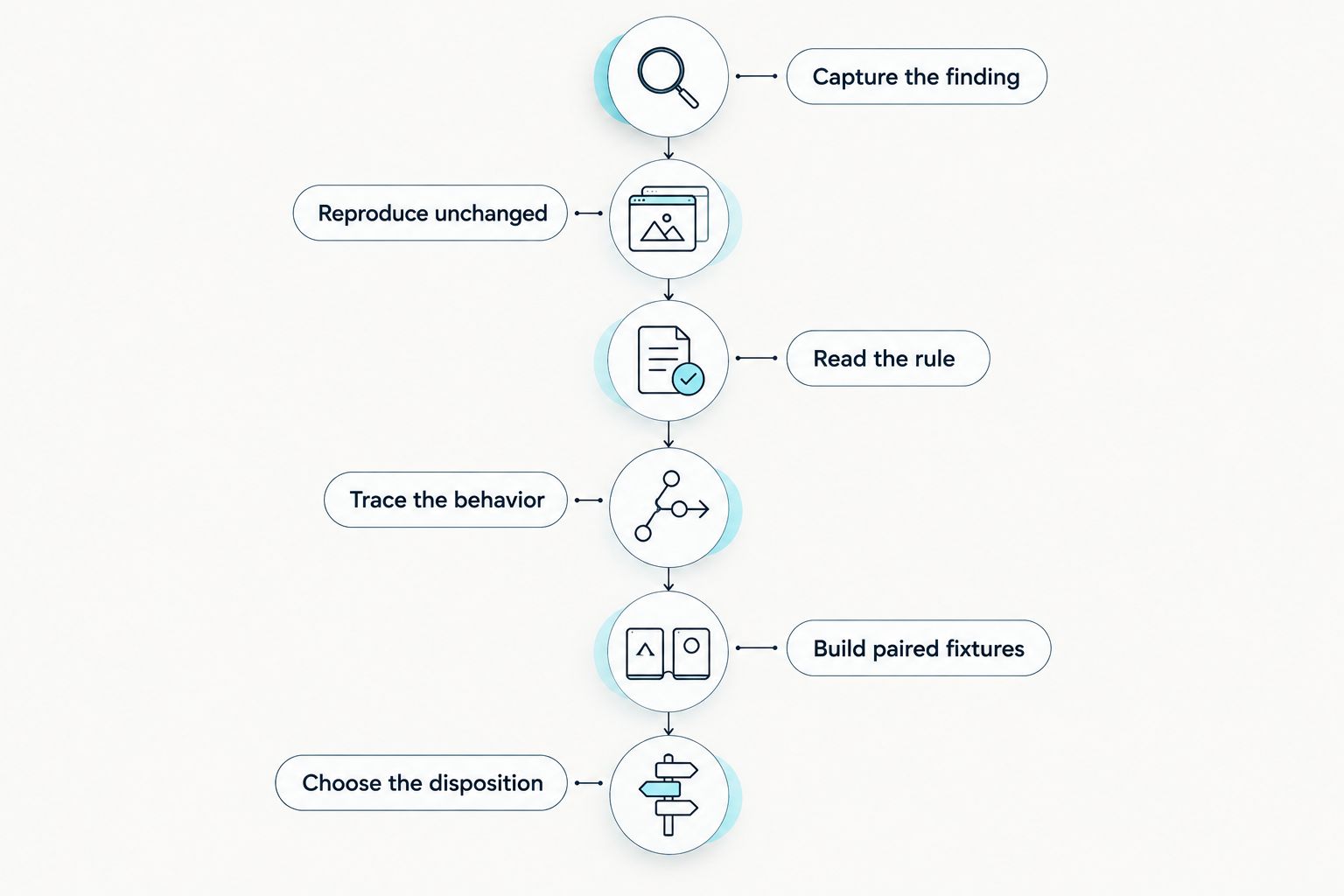
The investigation sequence is Capture the finding, Reproduce unchanged, Read the rule, Trace the behavior, Build paired fixtures, and Choose the disposition. Each step should leave evidence the next reviewer can inspect.
A swallowed-error example: inspect the caller contract
The following Python example is illustrative. It is not output from a particular linter or a claim about a specific repository.
def load_record(storage, key):
    try:
        return storage.read(key)
    except StorageError:
        logger.exception("Storage read failed")
        return None
Under the example rule above, logging does not establish that the caller receives an explicit failure result. Inspect what None means in this application. If it also means that no record exists, the caller cannot distinguish those outcomes from this return value alone.
Now compare an explicit failure result:
def load_record(storage, key):
    try:
        return Success(storage.read(key))
    except StorageError as error:
        return Failure(error)
This version exposes a distinct failure value. It does not, by itself, establish that every caller handles that value correctly. If the project rule also requires callers to handle failures, inspect the consuming methods before closing the finding.
The important distinction is the contract. A false-positive explanation should identify the actual failure signal and show how it satisfies the rule. Saying that the error is already handled leaves the central question unanswered.
Use this same approach with other findings: identify the required behavior, locate its implementation, and verify that the flagged execution path reaches it.
Why code linter false positives occur
Check these causes against the evidence. None is a reason to dismiss a warning without examining the flagged path.
- Ambiguous rule wording. Terms such as handled or safe need an observable condition. State what the method must return, reject, or propagate.
- Incorrect scope. A rule intended for application methods should not silently acquire a different purpose when applied to fixtures or generated code.
- Missing context. A helper or caller can contain the behavior needed to interpret a flagged statement. Verify that context directly.
- Configuration differences. Different checked files or exclusions can explain disagreement between editor and CI results.
- An incorrect finding. A linter can misidentify behavior. Preserve a reproducer that shows the claimed violation does not occur.
For your 2026 rule set, attach a passing example to each exception you add. Otherwise, the exception remains prose whose effect is difficult to check.
Should you ask a coding agent to review the warning?
Yes. Ask the agent to explain the alleged violation and inspect the relevant callers and callees. Keep the original diagnostic visible so the discussion stays tied to a specific claim.
| Workflow | Best for | Useful contribution | Limitation |
|---|---|---|---|
| Claude Code, Codex, or Cursor self-review | Investigating a change interactively | Discussing the finding and examining surrounding code | The explanation still needs verification against the rule |
| Perchscan semantic linting | Teams checking plain-English project rules in pull requests | Checking codebases for bugs, security issues, and project rules | A disputed finding still needs code-level investigation |
| Manual code tracing | Resolving a specific behavioral dispute | Establishing the relevant execution path and contract | The conclusion depends on the paths actually inspected |
Perchscan is best for teams that want plain-English project rules checked in pull requests. Use its open-source semantic linting for that workflow; do not build a setup around Perch Cloud features marked coming soon.
For a first scan, follow the setup guide for your coding agent and use its documented installation and scan commands. Start with a narrow behavior rule, then inspect the result using the sequence above. Keep the scan invocation with your investigation notes so another developer can reproduce it.
When should you suppress a linter warning?
Suppress a warning after establishing why the finding is incorrect or why the project accepts the violation. Those are different justifications. Record which one applies.
Use the narrowest suppression mechanism your linter documents. Include the rule, the relevant behavior, the evidence, and the condition that should trigger reconsideration. Do not invent suppression syntax or copy another tool's directive.
For a 2026 exception review, revisit the justification when the affected method, caller contract, or rule changes. A suppression that was correct for an earlier implementation does not establish that the current implementation is safe.
What should a false-positive report include?
A false-positive report should contain the diagnostic, exact rule, reproduction steps, relevant configuration, and expected behavior. Include the smallest reproducer that still demonstrates the disagreement.
State the mismatch directly: the finding claims a particular path violates the rule, but the supplied example shows the required behavior. Attach the paired failing example so a correction can preserve detection of the real defect.
Avoid reports that only say the code works. Successful execution of an unrelated path does not disprove the path described by the warning.
FAQ
What are code linter false positives?
Code linter false positives are findings that incorrectly report a violation of the applicable rule. Code that intentionally breaks the rule is an exception, not a false positive.
How do I prove a linter warning is wrong?
Prove the warning wrong by showing that the flagged execution path satisfies the rule. Preserve the diagnostic and provide a reproducible example with the relevant callers, callees, and configuration.
Should I disable a rule after a false positive?
Do not disable a rule solely because a finding is disputed. First test a narrow correction against passing and failing examples so the rule still catches the intended defect.
Can Claude Code or Codex investigate a failed lint check?
Claude Code or Codex can help inspect the warning and surrounding code. Verify the explanation against the actual rule and execution path before accepting its conclusion.
How many examples should I keep for a disputed rule?
Keep 2 fixtures as a starting point: 1 passing example and 1 failing example. Add cases when different branches or exceptions require separate evidence.
Is a confidence probability proof that a finding is correct?
A confidence probability is not proof that a finding is correct. Verify the claimed behavior against the code and rule rather than treating the probability as a substitute for evidence.
What should I record for a 2026 false-positive investigation?
Record the run date, checked revision, tool version, exact rule, configuration, and diagnostic for a 2026 investigation. These details identify the conditions another developer needs to reproduce the finding.
One last thing
Test the exception against a deliberately broken example. If your rule correction also accepts the defect, you have not demonstrated a false-positive fix; you have demonstrated a gap in the rule.
Perchscan findings should receive the same treatment as any other review claim: preserve the evidence, inspect the behavior, and keep the regression case. A green check ends a run. It does not explain why the rule is correct.